
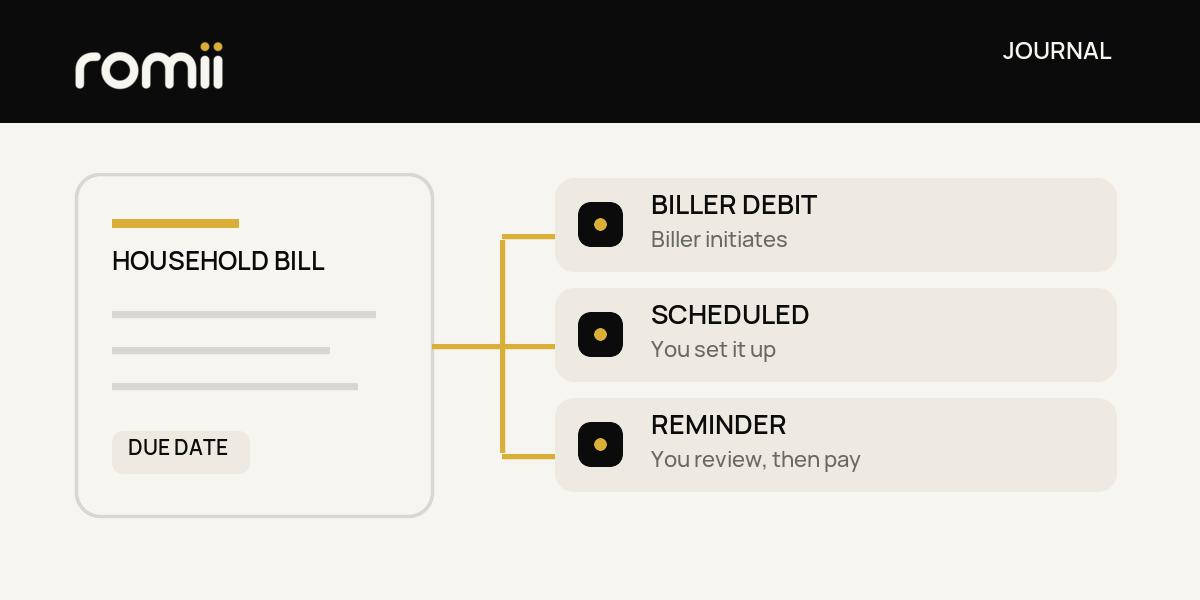
For a bill with a steady amount and enough money reliably available before it is processed, an automatic method may save a step. For a changing bill or uncertain pay timing, a reminder and manual review may give you more control. The choice is bill by bill: decide who starts the payment, what amount can be sent, when the money must be there, and how you will confirm it went through.
There are two different ways to automate. With a pre-authorized debit (PAD), you give a biller permission under an agreement to withdraw from your account. With a customer-scheduled automatic payment, you arrange the recurring payment yourself through your financial institution. A reminder only prompts you to look at the bill and make or approve a payment; it does not send money. The Financial Consumer Agency of Canada (FCAC) explains this PAD and automatic-payment distinction. Whether any of these options is available, and how it works, depends on the biller and your financial institution.
Start with what you know about the bill
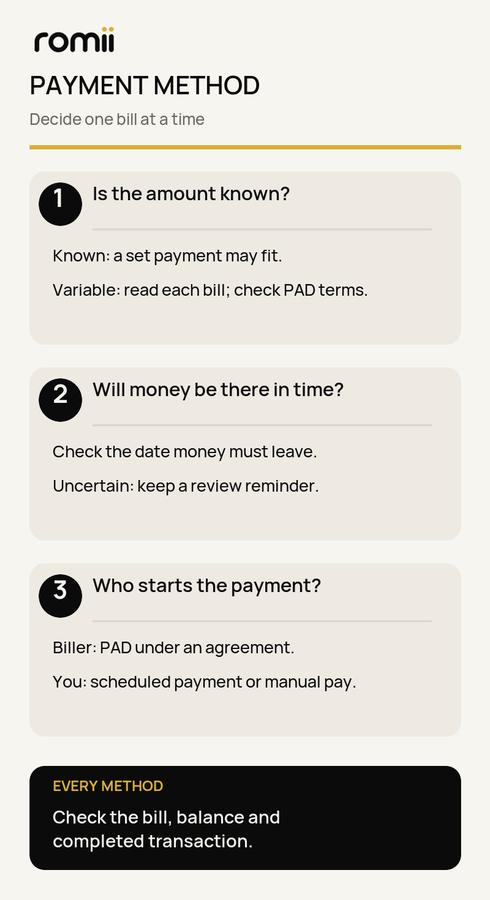
Look at a recent bill and account statement, then ask whether the amount is fixed, predictable within a range, or unknown until the statement arrives. A fixed amount can be easier to schedule yourself. A variable amount may call for checking the statement before deciding what to send. Some PAD agreements allow variable amounts, but the agreement determines what you have authorized; read and keep it before relying on a debit.
Next, compare the bill date with the dates money actually arrives. A calendar due date does not tell you exactly when a payment must leave your account. Check the provider's and financial institution's processing and cancellation timing. If pay arrives close to the expected withdrawal or transfer, a reminder may be the safer planning choice until you have a reliable cash buffer. That is a prompt to review, not a guarantee that a manual payment will arrive on time.
Finally, decide how much oversight you want. If you want to inspect every statement before money moves, keep a reminder. If you choose an automatic method, still read the new bill, watch the account balance, and check the completed transaction. Automation moves the payment step; it does not review a bill for you or prove that funds were available.
Three methods, three different jobs
Biller-initiated PAD. The biller withdraws according to your PAD agreement. Before setting one up, confirm the account, amount or amount rule, frequency, notice process and first withdrawal date with the biller. Keep the agreement and confirmation, then match actual withdrawals to bills and statements. FCAC advises checking PAD withdrawals and retaining the agreement. If you later stop a PAD, the underlying bill can still be owed; make a separate plan to pay it.
Customer-scheduled automatic payment. You set up the recurring instruction yourself through your financial institution, if it offers that option for the payee. This can fit an amount you know in advance. Check the payee details, amount, first date, repeat schedule and expected processing time. Review it when the bill changes; a standing instruction for an old amount may no longer cover the current bill.
Reminder plus manual review. Put a reminder early enough to open the bill, check the amount and available money, and make a payment through an offered method. Keep a second check for confirmation in your account and with the biller when available. A calendar notification, email or account alert is not payment evidence. FCAC suggests recurring reminders as part of regular budget review and notes that some institutions offer due-payment or available-credit alerts. Check what alerts your own provider offers and what each alert actually means.
No method is universally best. You can use different methods for different bills, or change a method as amounts and cash timing change.
A fictional three-bill example
Suppose Maya is paid on the 1st and 15th and starts each month with only the money already assigned to planned expenses. The amounts below are illustrative Canadian dollars, not typical costs or advice for a particular account. She checks each biller's available methods and payment timing before making a change.
- Internet, $70, due on the 12th. The amount has stayed at $70, and the 1st pay deposit leaves $70 available well before the date the payment would be processed. Maya considers a $70 customer-scheduled payment, then sets a reminder to compare the next bill and confirm the transaction. If the amount changes, she must update the instruction or pay the difference separately.
- Electricity, about $90–$160, due on the 18th. Maya does not know the exact amount until the statement arrives. A PAD could move the variable amount if the biller offers it and the agreement fits, but the 15th pay deposit may be too close to processing. She keeps a reminder for the statement date, checks the actual amount and balance, and pays manually with enough processing time. Once she has a steadier buffer, she can reconsider.
- Gym membership, $35, expected on the 27th. The provider offers a PAD. Maya reads the agreement and confirms the withdrawal details, then keeps a reminder to check the new statement and the debit. She does not treat the scheduled debit as proof that the account has $35 when it runs.
The three bills have different amount certainty, timing and oversight needs, so they lead to different provisional choices. Maya still needs enough money for all three: $70 + the actual electricity bill + $35. If electricity is $140, the total is $245; if it is $90, the total is $195. Neither payment method creates the difference. For a broader view of income and bill dates, use the payday bill calendar.
Copy this five-field audit for each bill
This is a manual note you can copy into a notebook. Leave an unknown field blank until you check it; an estimate is not a confirmed bill. One row per bill is enough.
1. Bill and amount: Name ________; next amount $________; fixed, variable or not yet known? ________
2. Dates and cash: Statement date ________; due date ________; date payment must leave ________; money expected to be available by then $________
3. Initiator and method: Biller PAD, my scheduled payment, or reminder/manual review? ________; is this method actually offered for this bill? ________
4. Instruction to verify: Agreement or payment amount ________; payee/account details checked on ________; processing or cancellation timing checked with ________
5. Follow-up check: New-bill review date ________; account transaction check date ________; action if amount or timing changes ________
Choose a method only after fields 1–4 make sense together. Put field 5 on your calendar even if you automate. Compare the bill and actual transaction, then update the row when the amount, due date or income timing changes. FCAC's budget guidance recommends using current bills and statements and comparing a budget with what actually happens.
If the real problem is that a bill lands before your pay, see how to ask to change a bill due date. A request does not change the date until the biller confirms it. For a bill that arrives only once or twice a year, plan for annual bills before choosing the payment instruction. A payment method cannot replace money you have not set aside.
Romii is in development. You can join the optional waitlist for launch updates; you can use this audit without joining. Applications are not open yet.